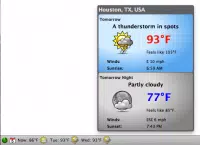

Download Forecastfox Weather – weather forecast, weather app, weather tool, current weather, weather radar
Overview
Forecastfox Weather is a lightweight, free add-on designed for Firefox users seeking immediate access to weather information without leaving their browser. The app functions as a browser extension, delivering real-time weather updates, forecasts, and radar imagery directly through the Firefox interface. Its primary purpose is to streamline weather monitoring for individuals who rely on timely, accurate data for daily planning, travel, commuting, or outdoor activities. By integrating weather functionality into the browser environment, it eliminates the need to navigate to third-party websites or standalone apps, reducing time and effort.
Target users include frequent travelers, commuters, outdoor enthusiasts, and anyone who checks weather conditions regularly. The app is especially useful for those already invested in the Firefox ecosystem and looking to enhance productivity through seamless tool integration. Although the developer, ForecastFox, is not widely documented beyond the app’s existence, the add-on has maintained consistent functionality since its release in 2012, indicating long-term stability and user trust.
Real-world use cases include checking morning weather before leaving home, monitoring storm patterns via radar during severe weather, or tracking conditions across multiple cities for business travel. In the broader context of browser-based tools, Forecastfox Weather occupies a niche role as a utility add-on that enhances user experience without requiring a separate mobile application. Its enduring presence reflects a demand for lightweight, focused tools that deliver specific value efficiently.
Key Features & Functionality
- Instant Weather Access: Users can retrieve current weather conditions and daily forecasts by entering a city name or zip code. The process is immediate, minimizing delays and enhancing usability for time-sensitive decisions.
- Customizable Toolbar: The toolbar can be positioned in multiple locations within Firefox, and users can choose to display icons, text, or both. This flexibility allows users to personalize their workspace based on visual preference and screen real estate.
- Radar Feature: The add-on includes a radar function that displays satellite imagery, providing visual insights into storm systems, precipitation, and cloud cover. This feature is particularly valuable during inclement weather, offering a layer of situational awareness.
- Multi-location Profiles: Users can create and switch between different location profiles, making it easy to monitor weather across multiple cities. This is ideal for individuals managing remote work, frequent travel, or family in different regions.
- Customizable Forecast Horizons: The app allows users to adjust how many days into the future they want to view forecasts. While it does not support extended forecasts beyond a few days, the adjustable range offers practical planning flexibility.
These features collectively serve users who value speed, customization, and situational awareness. For example, a remote worker checking weather in both their home city and a client’s location can quickly toggle between profiles. A commuter might use the radar feature to anticipate delays due to rain or snow. The app’s focus on integration and simplicity makes it a practical tool for daily use.
Interface, UX & Performance
Forecastfox Weather presents a clean, minimal interface designed to blend seamlessly with the Firefox browser environment. The toolbar is unobtrusive, with intuitive iconography and text labeling that enhances readability without cluttering the browser window. Navigation is straightforward—users interact directly with the toolbar to input locations, switch profiles, or toggle radar views.
Usability is optimized for efficiency, with no complex setup required. The layout adapts well to different screen sizes and resolutions, ensuring consistent access across desktop and laptop devices. Although the developer did not list formal performance metrics, the app’s lightweight footprint of 2.4 MB suggests low resource consumption, contributing to smooth operation even on older systems.
Responsiveness is generally prompt, with weather data loading quickly after input. Stability appears consistent over time, supported by the app’s long-standing presence in the Firefox ecosystem. The lack of frequent updates may reflect a mature, stable codebase rather than a lack of functionality. Users can expect reliable performance without significant lag or crashes under normal usage conditions.
Platform Compatibility & Technical Requirements
Forecastfox Weather is designed exclusively for the Firefox browser, with no official support for other platforms. The app is compatible with Firefox versions that support add-ons, though specific minimum OS requirements were not listed by the developer. The file size is 2.4 MB, indicating a compact and efficient installation.
Given its release date in 2012 and continued availability, the app has demonstrated compatibility with multiple generations of Firefox releases. However, users should ensure their browser is up to date to maintain optimal performance and security. The developer did not specify whether the add-on supports Windows, macOS, Linux, or mobile versions of Firefox.
Compatibility information was not fully disclosed, so users are advised to test the add-on in their current Firefox environment. The absence of mobile support suggests this is a desktop-focused tool, best suited for users who primarily access the web via desktop browsers.
Pros and Cons
Pros
- Free to download and use with no hidden costs
- Lightweight design with minimal impact on system resources
- Quick access to current weather and forecasts directly in Firefox
- Customizable toolbar positioning and display options
- Supports multiple location profiles for cross-city monitoring
Cons
- Not available on mobile platforms or other browsers
- Limited to daily forecasts; no extended 10-day or two-week outlooks
- Developer did not provide detailed technical specifications
- Update frequency is unclear, which may affect long-term compatibility
- Relies entirely on Firefox, limiting flexibility for multi-browser users
FAQ
Is Forecastfox Weather safe to install?
Yes, the add-on is free and available through official Firefox channels. It does not require elevated permissions and operates within the browser’s security framework.
Can I use Forecastfox Weather on mobile devices?
The app is designed exclusively for desktop versions of Firefox. There is no official mobile version or support for mobile browsers.
How often does the weather data update?
Weather information is refreshed automatically when the user interacts with the toolbar or manually refreshes the data. The exact update interval was not specified by the developer.
Is the radar feature always available?
Yes, the radar feature can be enabled or disabled based on user preference. It is included as part of the standard functionality.
Do I need to sign up or create an account?
No, the app does not require registration. Users can access weather data immediately after installation and configuration.
Final Thoughts + CTA
Forecastfox Weather remains a reliable, no-frills solution for Firefox users who prioritize quick access to weather data. Its minimalist design, customizable interface, and support for multiple locations make it a practical tool for daily use. While it lacks advanced forecasting or mobile availability, its core functionality is well-executed and consistent with user expectations.
For individuals already using Firefox and seeking a lightweight, free weather add-on, Forecastfox Weather delivers tangible value without complexity. It’s particularly suited for those who prefer integrated browser tools over standalone apps. Despite its age, the app continues to function effectively, demonstrating the enduring utility of focused, well-designed utilities.
Download Forecastfox Weather now


